Table of Contents
If you’ve spent any time working with download managers over the last decade, you’ve likely used Internet Download Manager (IDM). It’s a classic download manager, but the proprietary license, the trial expirations, and the lack of native cross-platform support can be a headache. In this post, I’m going to introduce you to Mister Download Manager (MDM) – a completely free, open-source alternative that rebuilds that familiar layout from the ground up in Rust. Sounds interesting? Let’s dive in.
What Is Mister Download Manager?
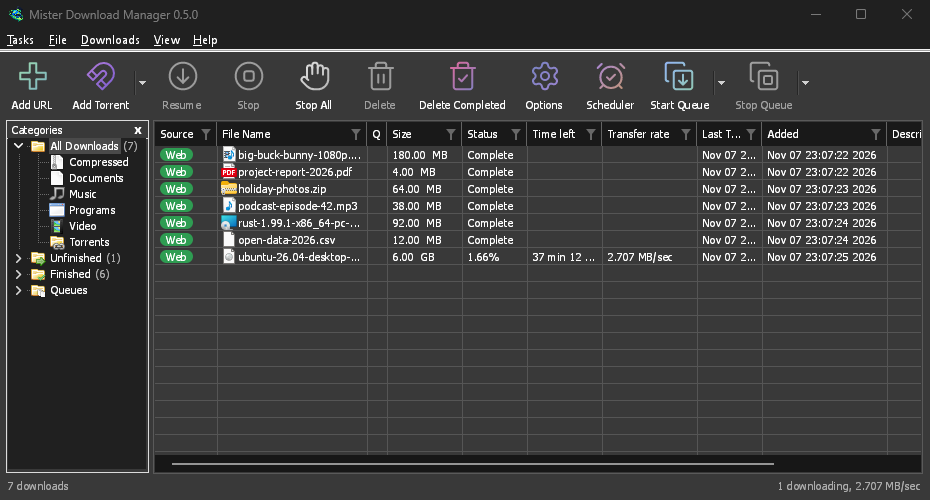
Mister Download Manager is an independent, clean-room download manager built in pure Rust. MDM guarantees no ads, no trials, and zero telemetry. It operates under the GPL-3.0 license (i.e., it’s open source) and supports all three popular operating systems: Windows, Linux, and macOS.
Because it’s written in Rust, it’s incredibly lightweight and fast. It takes the classic multi-connection download acceleration you’re used to and provides additional features like support for 86 built-in languages, custom DNS, and even a native dark mode that follows your system settings.
Why Choose MDM Over Others?
For years, users have stuck with paid options simply because the browser integration and video sniffing were unmatched. MDM brings that same seamless browser integration across Chrome, Firefox, Brave, LibreWolf, and others, but extends it with features you usually need separate apps for.
MDM vs. Internet Download Manager (IDM)
| Feature | Mister Download Manager (MDM) | Internet Download Manager (IDM) |
|---|---|---|
| Licensing | Free & Open Source (GPL-3.0) | Proprietary / Paid |
| OS Support | Windows, Linux, macOS | Windows only |
| Video Grabbing | Native (via yt-dlp / ffmpeg) | Native (Proprietary) |
| BitTorrent & Magnets | Built-in | None |
| AI / MCP Support | Yes (Claude, Cursor, VS Code) | None |
| Connections per File | Up to 128 | Up to 32 |
Standout Features
MDM isn’t just a basic HTTP downloader; it packs a serious toolkit for power users. It brings better features than Internet Download Manager (IDM) for zero cost and downloads faster than all browsers.
Acceleration & Crash-Safe Resume
Like classic downloaders, MDM splits files into multiple segments – downloading up to 128 connections simultaneously – to saturate your bandwidth. If your network drops or your PC crashes, its crash-safe resume ensures you don’t have to start a 50 GB download from scratch. It even follows complex browser redirects and handles expired links gracefully – better than premium download managers.
BitTorrent and Video Downloads
MDM natively handles .torrent and magnet links directly in the main queue. You can watch torrents download, select specific files to keep, and even stream sequentially – all within MDM.
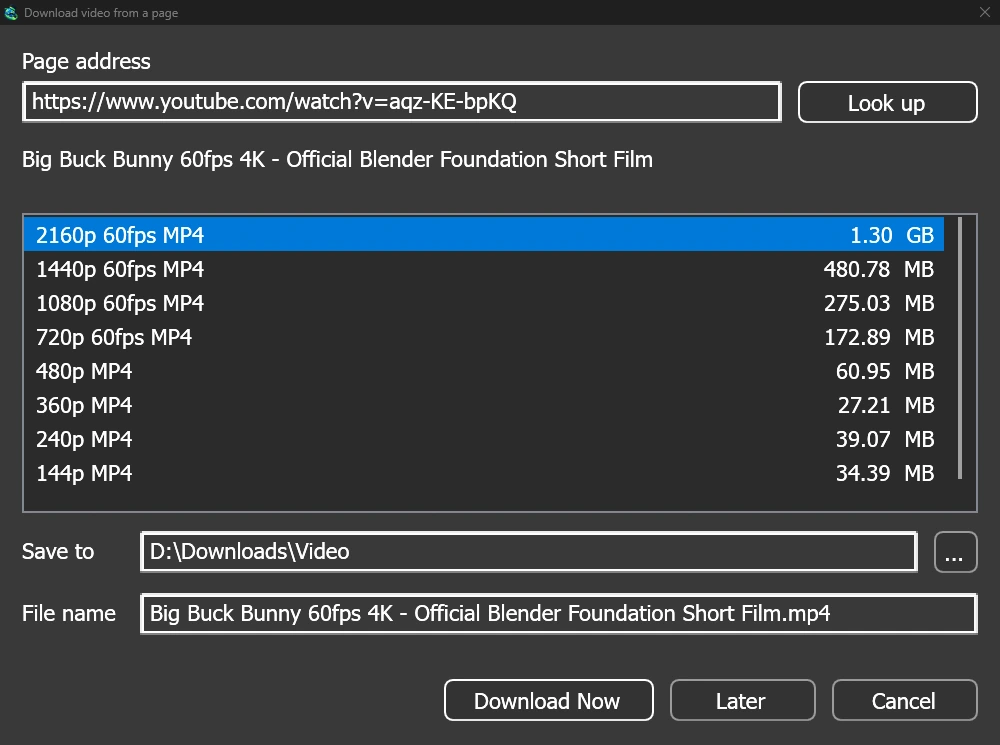
For downloading videos, MDM uses yt-dlp under the hood. A download button automatically appears over web videos, letting you grab them (or extract just the audio as MP3, Opus, or FLAC). Once downloaded, files are automatically sorted into smart categories based on their extensions.
Server Mode and AI Assistants (MCP)
If you’re running a homelab, Mister Download Manager (MDM) is a dream come true. You can run it in server mode, i.e., headless on a NAS, Docker, or Unraid using the --headless flag.
More impressively, it supports the Model Context Protocol (MCP). You can wire MDM directly into Claude Desktop or Cursor, allowing your AI assistants to list, add, pause, or resume your downloads via natural language prompts. It also includes an IDM-compatible CLI wrapper (misterdownloadmanager-cli) so your existing automation scripts using IDM will work right out of the box with MDM.
Getting Started
Let’s set up MDM and configure the browser extension to start catching links automatically.
Installing MDM and Browser Integration
- Head to its official Download page
, download the installer (or the portable
.zip(for Windows only) if you don’t want to install it locally on your PC) and run it to install MDM. - Check its extensions page for installing its browser extension for Firefox, Chrome, or your browser of choice. Note for macOS: MDM app packs the extension for Safari browser.
- Once you have installed both MDM and its browser extension and they are paired, MDM will catch your downloads just before the browser’s default “Save As” dialog appears.
Enabling MCP Server for AI Assistants
If you want to let Claude or Cursor manage your downloads and queues in MDM:
- Ensure MDM is running in the background (or run it in server mode ).
- Add the MDM MCP server to your
claude_desktop_config.jsonor Cursor settings. - Simply ask your assistant: “Check my download queue and pause any large downloads.”
Conclusion
Mister Download Manager successfully brings the classic download manager experience along with modern features. By combining a fast and lightweight Rust engine with support for torrents, advanced video sniffing, and AI automation, it easily earns its spot as your new download manager.
References
- Mister Download Manager [ Features (original) (archived) ]
- Mister Download Manager [ How Is MDM Different from IDM? (original) (archived) ]
- Mister Download Manager [ AI Assistants (MCP) (original) (archived) ]
↫ Previous post